
Why is M269 so difficult?
The sibling algorithms module — the same steady-practice mindset that makes hard OU computing manageable.
Not sure where to start? Talk to our support team live.

Computing & Study Skills
M250 asks you to think in objects while learning Java at the same time, which is what makes it feel hard. This UK guide explains what M250 covers, why students struggle, and how to plan your study, practise in BlueJ and act on tutor feedback.
The short version
M250, the Open University’s Object-Oriented Java Programming module, feels challenging because it asks you to think in objects — classes, encapsulation, inheritance and polymorphism — while learning Java syntax at the same time. It is demanding rather than impossible: steady weekly practice in BlueJ, and acting on tutor feedback, make it far more manageable.
On this page
The basics
M250 is the Open University module Object-oriented Java programming. It teaches programming in Java using an “objects-first” approach and the BlueJ environment, which lets you create and interact with objects directly so the ideas feel concrete before you write large programs.
Its core themes are classes and objects, encapsulation (private fields and public methods), collections such as the ArrayList, inheritance, polymorphism, interfaces, exceptions and file input/output. If you are deciding whether the module is for you, or you are mid-way and struggling, our computing and IT assignment support explains what UK markers look for — while your code and submissions stay entirely your own. For the exact assessment structure, study calendar and module rules, always rely on your official module website and materials.
The honest answer
M250 has a reputation for being a step up, and the reasons are consistent:
Reassurance “Challenging” is not “impossible”. Almost every struggle above has the same fix: build objects by hand in BlueJ, practise little and often, and act on your tutor’s feedback rather than filing it away.
Core ideas
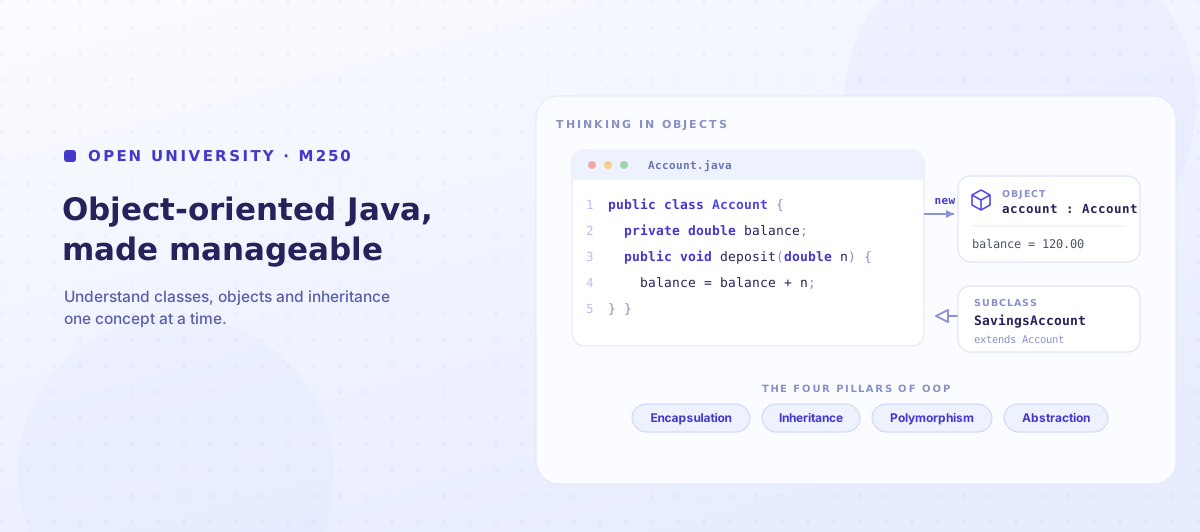
A class is a blueprint; an object is a specific thing built from it. A BankAccount class defines what every account has (a balance) and can do (deposit, withdraw); each actual account is an object with its own balance. Encapsulation means keeping an object’s data private and exposing it only through methods, so the object controls its own state.
This is where BlueJ helps most: you can create an object, call its methods and watch its state change, which makes the blueprint-versus-instance idea concrete. Practise by modelling small, familiar things — a book, a playlist, a ticket — as a class with a few fields and methods, then create objects and test them one method at a time.
The harder half
Inheritance lets one class build on another: a SavingsAccount can extend Account, reusing its fields and methods and adding its own. Polymorphism is the payoff — code written for the general type (Account) works for every specific subtype, so the same call behaves correctly for each. Interfaces take this further by defining a contract of methods a class promises to provide.
These are the concepts most M250 students find hardest, because they are about relationships between classes rather than single lines of code. The fix is to draw the relationship before you code it: sketch which class is the parent, what the child adds or overrides, and what each object should do. Get the design right on paper and the Java usually follows.
Concept map
| Concept | What it is | Why it feels hard | How to practise |
|---|---|---|---|
| Classes & objects | Blueprint vs specific instance | The abstraction is new | Model a small real thing; create objects in BlueJ |
| Encapsulation | Private data, public methods | Feels like extra ceremony | Make fields private; access them only via methods |
| Collections (ArrayList) | Storing many objects | Managing a group of objects | Add, remove and loop over a small list |
| Inheritance | One class extends another | Relationships, not single lines | Draw parent/child before coding |
| Polymorphism | One call, many behaviours | Hard to picture at runtime | Trace which method runs for each object |
| Interfaces | A contract of methods | Abstract and rule-like | Implement one small interface two ways |
| Exceptions & files | Handling errors and persistence | Many moving parts | Read/write one small file; handle one error |
A study aid only — always follow your official M250 materials for the definitive definitions, scope and assessment.
Study planning
Because M250 is cumulative, consistency beats intensity. Short, regular sessions at the keyboard beat one long weekend push. A workable weekly rhythm looks like:
The free planner below turns this into a reusable weekly tracker with study hours and concept checkpoints. For official module and assessment guidance, the Open University Help Centre is the place to go, and the official Java documentation is a reliable syntax reference.
Assessment prep
For a tutor-marked assignment, read the task slowly and make sure your code does exactly what is asked — the right classes, methods and behaviour — rather than something close. Start early, test as you go, and keep every submission your own.
The biggest gains in a cumulative coding module, though, come after a TMA is returned. Tutor feedback on M250 is where you learn what your code got wrong and why — but only if you act on it. Read the comments, identify the recurring issues (naming, encapsulation, edge cases, structure), and carry them into the next TMA. If UK-style feedback is unfamiliar, our guide to understanding UK feedback helps you read it, and our computing assignment support explains what markers look for.
Act on your feedback
Got an M250 TMA back with comments you’re not sure how to action?
Feedback Decoder turns your tutor’s comments into a clear, specific list of what to change next time — so the same points don’t cost you marks on the next assignment. You make the changes; your code stays your own.
Decode My FeedbackRevision
Revise M250 by building, not re-reading. Re-create a class from a blank editor, explain a concept aloud as if teaching it, and keep a one-page summary of each idea with a tiny code example. Space your practice over weeks so it sticks.
The most common mistakes are avoidable:
Break the cycle
Stop losing the same marks on every M250 TMA
Feedback Decoder helps you understand exactly what your tutor’s comments mean and turn them into concrete next steps, so each TMA builds on the last. The learning and the code stay yours.
Try Feedback DecoderBefore your next TMA
Use this on your own study and code — always defer to your official M250 materials for the definitive requirements.
Why us
My Perfect Writing helps OU computing students understand their brief, make sense of tutor feedback and review their own work — while they stay responsible for their own study, code and submissions. We do not complete assessments or write TMAs.
Feedback Decoder turns tutor comments on a returned TMA into clear, specific actions you can apply to your next one.
Brief Decoder helps you read a TMA task — the required classes, methods and behaviour — so you answer exactly what M250 asks.
Marker’s Eye reviews your own written work against UK marking expectations for clarity and structure — you make the changes.
Guidance reflects how UK and Open University study works, including tutors, TMAs and self-directed learning.
The study, problem-solving and code remain yours. We do not complete assessments or write TMAs for you.
Use the free Concept & TMA Planner to plan study and log feedback before you need any further guidance.
You stay responsible for your own M250 work — our tools help you understand and review it, they do not do it for you.
Questions